Disable Lost or Stolen
Key Fob
Prevent unauthorized vehicle entry by disabling a lost or stolen T1N Sprinter key fob in under 2 minutes.
Simple ignition + fob sequence
No tools or dealer visit needed
Can be programmed to one vehicle
Physical key still works after this
When Do You Need This?
Lost or Stolen Fob
A missing key fob can be used to remotely unlock your van. Disable it immediately to prevent unauthorized access to the cargo area or cabin.
Adding a New Fob
Bought a replacement fob? Use this same procedure to program it. Any fob pressed in step 5 will be activated, including new ones.
Re-Enabling a Fob
Found the "lost" fob? Repeat the procedure with all fobs you want active. Previously disabled fobs can be re-enabled at any time.
What You'll Need
- Ignition key - must be a working key for the vehicle
- ALL remaining key fobs - every fob you want to keep active must be present
- Access to the driver's seat (ignition switch)
Before You Start
- Gather every key fob you want to keep, as any fob not pressed in step 5 will be disabled
- Read the full procedure before starting, as timing is critical
- The engine does not need to be running
- Close all doors before starting
Disable Procedure (5 Steps)
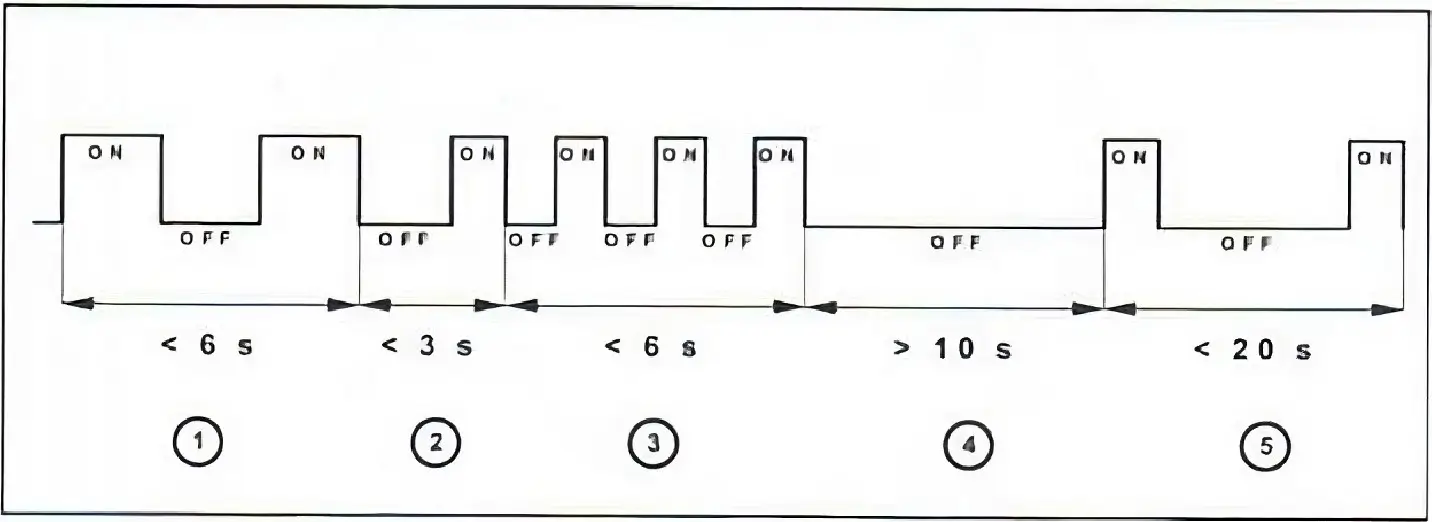
Ignition ON/OFF Twice
Switch the ignition ON and OFF twice within 6 seconds. Do not start the engine. Just turn the key to position 2 and back.
Press Any Fob Button
Within 3 seconds after turning the ignition OFF, press any button (lock or unlock) on one of your key fobs.
Press 3 More Times
Press any key fob button (lock or unlock) 3 more times within 6 seconds. The system is now in programming mode.
Wait 10 Seconds
Do nothing for 10 seconds. The system is processing and preparing for the final activation step.
Activate ALL Remaining Fobs
Within the next 20 seconds, press any button on every key fob you want to keep active, at least once per fob.
After the Procedure
Verify It Worked
- Test each remaining fob; lock and unlock should work normally
- If a fob doesn't respond, repeat the procedure ensuring that fob is pressed in step 5
- Check that the panic alarm button works on all active fobs
Additional Security Steps
- If the key blade was also lost/stolen, contact a dealer to reprogram the immobilizer
- Consider a steering wheel lock for visible theft deterrent
- Check if your insurance covers lock/key replacement
- Order a replacement fob and program it using the same procedure
Key Fob Maintenance Tips
Battery Replacement
The T1N key fob uses a CR2032 coin cell battery. Replace it when range decreases noticeably. The battery typically lasts 2-3 years. Pry the case apart carefully with a flathead screwdriver and avoid touching the circuit board.
Weak Signal?
If the fob range has decreased, try a fresh battery first. If still weak, the internal antenna may be damaged. Also check for nearby RF interference, as some aftermarket alarm systems or cell phone boosters can affect fob range.
Water Damage
If the fob gets wet, open it immediately and let it dry completely before reinserting the battery. Do not use a hair dryer, as the heat can damage the circuit board. Rice or silica gel packets help absorb moisture.
Keep a Spare
Always have at least 2 working fobs. Replacement fobs are available online. Look for ones compatible with the T1N Sprinter (2002–2006). Program using the 5-step procedure above.
Frequently Asked Questions
Need Help with Key Fob Issues?
Get troubleshooting advice from experienced T1N owners in the community.
Ask the Community